
01
The project, up to date
Progress, ownership, due dates and blockers sit in one place. No rebuilding the status from message threads.
For teams that want to know where work stands
TaskTorch keeps projects, tasks, time, costs and conversations in one place. No side spreadsheets and no “where are we?” round at every meeting.
Free plan · no card required
Everything you track on a project, in one place
When work gets scattered
A status update in chat, hours in a spreadsheet, files somewhere else and costs checked at month end. TaskTorch keeps them attached to the project and task where the work actually happens.
Progress, ownership, due dates and blockers sit in one place. No rebuilding the status from message threads.
Start the timer or add time manually where the work happened. Then see what the project consumed and what is billable.
See hours, due work, activity and costs, then filter, export or schedule the report you need.
Roles, groups and permissions make it clear who can view or change each area.
Public forms and documents bring information into TaskTorch without copy-pasting from email and side spreadsheets.
The inbox and email tell people what changed and which task it belongs to, reducing follow-up questions.
Without digging through five screens
See progress, workload and projects starting to slip before they become urgent.
TaskTorch / Projects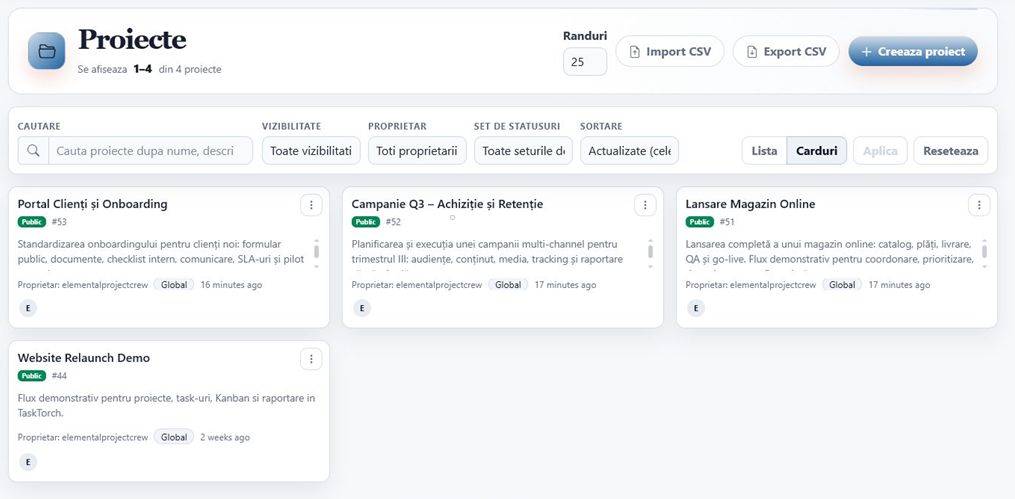
How work enters TaskTorch
Collect requests through forms or directly in a project and keep the documents beside them.
Turn the work into tasks with owners, due dates, priorities and clear statuses.
The team works, discusses, attaches files and tracks time directly on each task.
See what finished, what is late and what it cost before deciding what happens next.
One platform, different needs
Sees projects, due dates, time and costs without asking for another status update in chat.
Knows what to do, what matters first and where to leave updates, files and tracked time.
Gets access only to what they need, without entering the team’s internal areas.
Plans that grow with the team
Projects, tasks and the core workflow stay the same. Higher plans add limits, reporting, exports and administrative control.
See the differences between plansSee if it fits your team
Put a real project into TaskTorch, invite the team and see how it feels in day-to-day work.
For teams working here every day
When TaskTorch becomes the team’s daily workspace, you get higher limits, exports and saved views.
For coordination and costs
For teams that want to track not only what gets done, but also time, costs and access.
Yes. You can create a workspace on the Free plan and evaluate it without entering a card.
No. Tasks are only one part of it. You can also track projects, time, conversations, files, costs and reports in the same place.
No. Start with one real project and a small team. Move more work only if the workflow fits.
Yes. Roles, groups and permissions define which areas each person can view or change.
Start small
You do not have to move the whole company at once. Create a Free workspace, add a project your team is working on now and see if the workflow fits.